## Charts version 5 - Under Development, use 4.X for stable version

## Table Of Contents
- [Installation](#installation)
- [Default Settings](#default-settings)
- [Example Usage](#example-usage)
- [Create Charts](#create-charts)
- [Multi Datasets Chart](#multi-datasets-charts)
- [Database Charts](#database-charts)
- [Multi Database Charts](#multi-database-charts)
- [Realtime Charts](#realtime-charts)
- [Math Functions Charts](#math-functions-charts)
- [Charts Functions](#charts-functions)
- [Available Chart Settings](#available-chart-settings)
- [Chart Examples](#chart-examples)
- [Charts in tabs](#charts-in-tabs)
- [Extend your way](#extend-your-way)
## Installation
### Download
```
composer require consoletvs/charts:5.*
```
### Add service provider & alias
**NOTE: If you're using laravel 5.5+ you can skip this step.**
Add the following service provider to the array in: ```config/app.php```
```php
ConsoleTVs\Charts\ChartsServiceProvider::class,
```
Add the following alias to the array in: ```config/app.php```
```php
'Charts' => ConsoleTVs\Charts\Facades\Charts::class,
```
### Publish the assets
```
php artisan vendor:publish
```
## Default Settings
The file in: ```config/charts.php``` contains an array of settings, you can find the default settings in there.
## Default Chart Views
The default chart views are published as well at the resources/views/vendor folder
## Example Usage
Example Controller:
```php
title("My Cool Chart")
// A dimension of 0 means it will take 100% of the space
->dimensions(0, 400) // Width x Height
// This defines a preset of colors already done:)
->template("material")
// You could always set them manually
// ->colors(['#2196F3', '#F44336', '#FFC107'])
// Setup the diferent datasets (this is a multi chart)
->dataset('Element 1', [5,20,100])
->dataset('Element 2', [15,30,80])
->dataset('Element 3', [25,10,40])
// Setup what the values mean
->labels(['One', 'Two', 'Three']);
return view('test', ['chart' => $chart]);
}
}
```
Example View:
```html
My Charts
{!! Charts::assets() !!}
{!! $chart->html() !!}
{!! $chart->script() !!}
```
## Create Charts
| Create Charts | line | area | bar | pie | donut | geo | gauge | temp | percentage | progressbar | areaspline | scatter |
|---------------|------|------|-----|-----|-------|-----|-------|------|------------|-------------|------------|---------|
| echarts | x | x | x | x | x | - | x | - | - | - | - | - |
| chartjs | x | x | x | x | x | - | - | - | - | - | - | - |
| highcharts | x | x | x | x | x | x | - | - | - | - | - | - |
| google | x | x | x | x | x | x | x | - | - | - | - | x |
| material | x | - | x | - | - | - | - | - | - | - | - | - |
| chartist | x | x | x | x | x | - | - | - | - | - | - | - |
| fusioncharts | x | x | x | x | x | - | - | - | - | - | - | - |
| morris | x | x | x | - | x | - | - | - | - | - | - | - |
| plottablejs | x | x | x | x | x | - | - | - | - | - | - | - |
| minimalist | x | x | x | x | x | - | - | - | - | - | - | - |
| c3 | x | x | x | x | x | - | x | - | - | - | - | - |
| canvas-gauges | - | - | - | - | - | - | x | x | - | - | - | - |
| justgage | - | - | - | - | - | - | x | - | x | - | - | - |
| progressbarjs | - | - | - | - | - | - | - | - | x | x | - | - |
The first argument of the create method is the chart type, and the second is the library
```php
Charts::create('line', 'highcharts')
->title('My nice chart')
->labels(['First', 'Second', 'Third'])
->values([5,10,20])
->dimensions(0,500);
```
## Multi Datasets Charts
| Multi Dataset Charts | line | area | bar | pie | donut | geo | gauge | temp | percentage | progressbar | areaspline | scatter |
|----------------------|------|------|-----|-----|-------|-----|-------|------|------------|-------------|-------------|---------|
| echarts | x | x | x | - | - | - | - | - | - | - | - | - |
| chartjs | x | x | x | - | - | - | - | - | - | - | - | - |
| highcharts | x | x | x | - | - | - | - | - | - | - | x | - |
| google | x | x | x | - | - | - | - | - | - | - | - | - |
| material | x | - | x | - | - | - | - | - | - | - | - | - |
| chartist | x | x | x | - | - | - | - | - | - | - | - | - |
| fusioncharts | x | x | x | - | - | - | - | - | - | - | - | - |
| morris | x | x | x | - | - | - | - | - | - | - | - | - |
| plottablejs | x | x | x | - | - | - | - | - | - | - | - | - |
| minimalist | x | x | x | - | - | - | - | - | - | - | - | - |
| c3 | x | x | x | - | - | - | - | - | - | - | - | - |
| canvas-gauges | - | - | - | - | - | - | - | - | - | - | - | - |
| justgage | - | - | - | - | - | - | - | - | - | - | - | - |
| progressbarjs | - | - | - | - | - | - | - | - | - | - | - | - |
To create multi-dataset charts simply add the values using the ```setDataset()``` function!
```php
Charts::multi('line', 'highcharts')
->colors(['#ff0000', '#00ff00', '#0000ff'])
->labels(['One', 'Two', 'Three'])
->dataset('Test 1', [1,2,3])
->dataset('Test 2', [0,6,0])
->dataset('Test 3', [3,4,1]);
```
- dataset(required string $element_label, required array $values)
```php
Charts::multi('bar', 'minimalist')
->responsive(false)
->dimensions(0, 500)
->colors(['#ff0000', '#00ff00', '#0000ff'])
->labels(['One', 'Two', 'Three'])
->dataset('Test 1', [1,2,3])
->dataset('Test 2', [0,6,0])
->dataset('Test 3', [3,4,1]);
```
## Database Charts
You can also generate database charts with simple setup!
```php
$chart = Charts::database(User::all(), 'bar', 'highcharts');
```
Example data:

**Note:** You are required to use a specific group method before rendering the chart!
*Important:* To work with the *GroupByYear, GroupByMonth, GroupByDay, lastByYear, lastByMonth & lastByDay* you'll need the column ```created_at``` in the data rows.
The available methods are:
- data(required mixed $data)
Setup the data again.
```php
$chart = Charts::database(User::all(), 'bar', 'highcharts')->data(Role::all());
```
- dateColumn(required string $column)
Set the column to group the data.
*Default:* ```created_at```
```php
$chart = Charts::database(User::all(), 'bar', 'highcharts')->dateColumn('my_date_column');
```
- dateFormat(required string $format)
Set the fancy date format for `groupByDay()` and `lastByDay()` function if `$fancy` set to true, must be called before those function.
*Default:* ```l dS M, Y```
```php
$chart = Charts::database(User::all(), 'bar', 'highcharts')->dateFormat('j F y');
```
- monthFormat(required string $format)
Set the fancy date format for `groupByMonth()` and `lastByMonth()` function if `$fancy` set to true, must be called before those function.
*Default:* ```F, Y```
```php
$chart = Charts::database(User::all(), 'bar', 'highcharts')->monthFormat('F Y');
```
- hourFormat(required string $format)
Set the fancy date format for `groupByHour()` function if `$fancy` set to true, must be called before those function.
*Default:* ```D, M j, Y g A```
```php
$chart = Charts::database(User::all(), 'bar', 'highcharts')->hourFormat('j, g A');
```
- groupBy(required string $column, optional string $relationColumn, optional array $labelsMapping)
Groups the data based on a column.
*Note:* Relationship column follows this standard: ```->groupBy('product_id', 'product.model');``` where second argument will set labels to model column of product table based on it's relationship with the model.
```php
$chart = Charts::database(User::all(), 'bar', 'highcharts')
->elementLabel("Total")
->dimensions(1000, 500)
->responsive(false)
->groupBy('game');
```
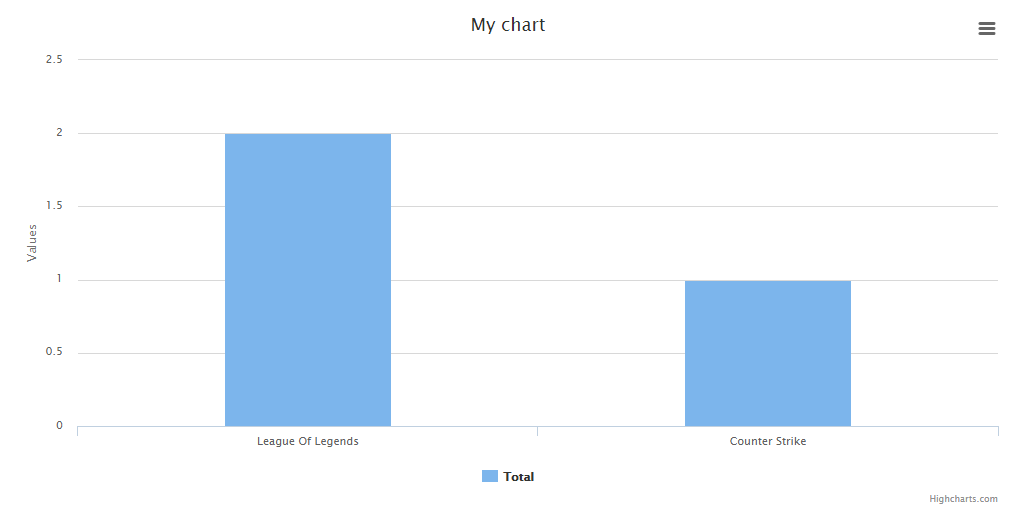
You can use the $labelsMapping to override labels. The following example overrides the label of different user types stored as integer in database.
```php
$chart = Charts::database(User::all(), 'pie', 'highcharts')
->title('User types')
->dimensions(1000, 500)
->responsive(false)
->groupBy('type', null, [1 => 'Admins', 2 => 'Users', 3 => 'Trainees']);
```
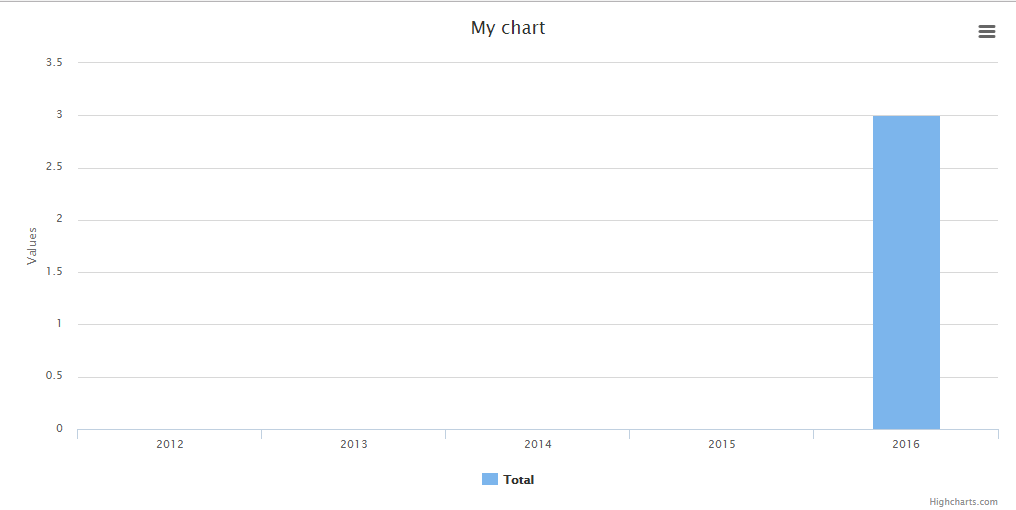
- groupByYear(optional int $years)
Groups the data based in years.
*Default:* ```$years = 4```
```php
$chart = Charts::database(User::all(), 'bar', 'highcharts')
->elementLabel("Total")
->dimensions(1000, 500)
->responsive(false)
->groupByYear();
// to display a number of years behind, pass a int parameter. For example to display the last 10 years:
$chart = Charts::database(User::all(), 'bar', 'highcharts')
->elementLabel("Total")
->dimensions(1000, 500)
->responsive(false)
->groupByYear(10);
```
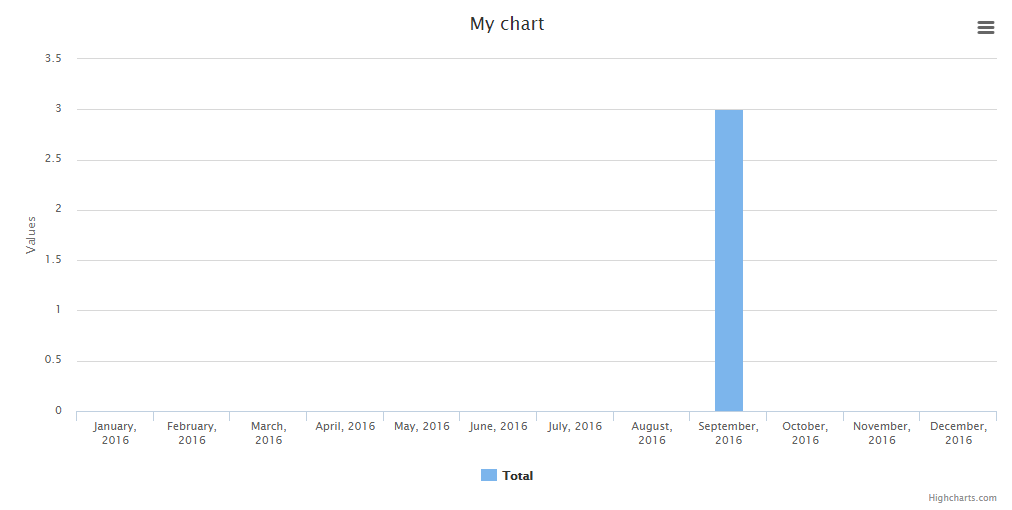
- groupByMonth(optional string $year, optional boolean $fancy)
Groups the data in months (if no year set, the current one will be used).
*Default:* ```$year = 7, $fancy = false```
```php
$chart = Charts::database(User::all(), 'bar', 'highcharts')
->elementLabel("Total")
->dimensions(1000, 500)
->responsive(false)
->groupByMonth();
// to display a specific year, pass the parameter. For example to display the months of 2016 and display a fancy output label:
$chart = Charts::database(User::all(), 'bar', 'highcharts')
->elementLabel("Total")
->dimensions(1000, 500)
->responsive(false)
->groupByMonth('2016', true);
```
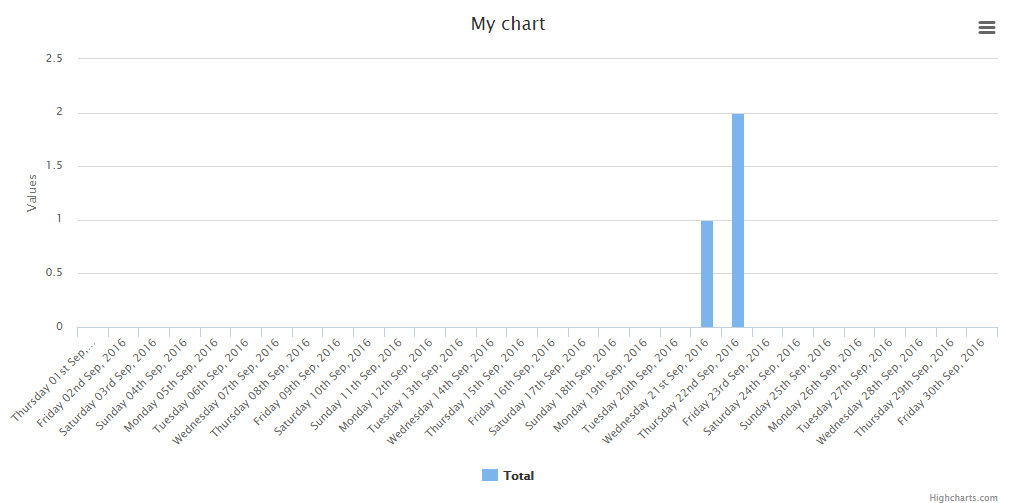
- groupByDay(optional string $month, optional string $year, optional boolean $fancy)
Groups the data in days (if no year/month set, the current one will be used).
*Default:* ```$month = date('m'), $year = date('Y'), $fancy = false```
```php
$chart = Charts::database(User::all(), 'bar', 'highcharts')
->elementLabel("Total")
->dimensions(1000, 500)
->responsive(false)
->groupByDay();
// to display a specific month and/or year, pass the parameters. For example to display the days of september 2016 and display a fancy output label:
$chart = Charts::database(User::all(), 'bar', 'highcharts')
->elementLabel("Total")
->dimensions(1000, 500)
->responsive(false)
->groupByDay('09', '2016', true);
```
- groupByHour(optional string $day, optional string $month, optional string $year, optional boolean $fancy)
Groups the data in hours (if no year/month/day set, the current one will be used).
*Default:* ```$month = date('m'), $year = date('Y'), $fancy = false```
```php
$chart = Charts::database(User::all(), 'bar', 'highcharts')
->elementLabel("Total")
->dimensions(1000, 500)
->responsive(false)
->groupByHour()
// to display a specific day and/or month and/or year, pass the parameters. For example to display the hours of May 12, 2017, and display a fancy output label:
$chart = Charts::database(User::all(), 'bar', 'highcharts')
->elementLabel("Total")
->dimensions(1000, 500)
->responsive(false)
->groupByHour('12', '05', '2017', true)
```

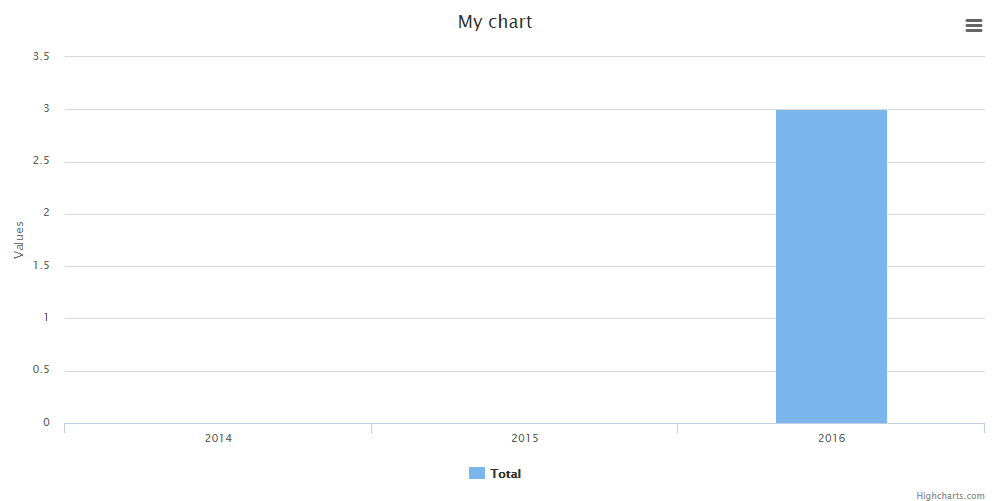
- lastByYear(optional int $number)
Alias for groupByYear() method. Does the same.
*Default:* ```$number = 4```
```php
$chart = Charts::database(User::all(), 'bar', 'highcharts')
->elementLabel("Total")
->dimensions(1000, 500)
->responsive(false)
->lastByYear();
// to display a number of years behind, pass a int parameter. For example to display the last 3 years:
$chart = Charts::database(User::all(), 'bar', 'highcharts')
->elementLabel("Total")
->dimensions(1000, 500)
->responsive(false)
->lastByYear(3);
```
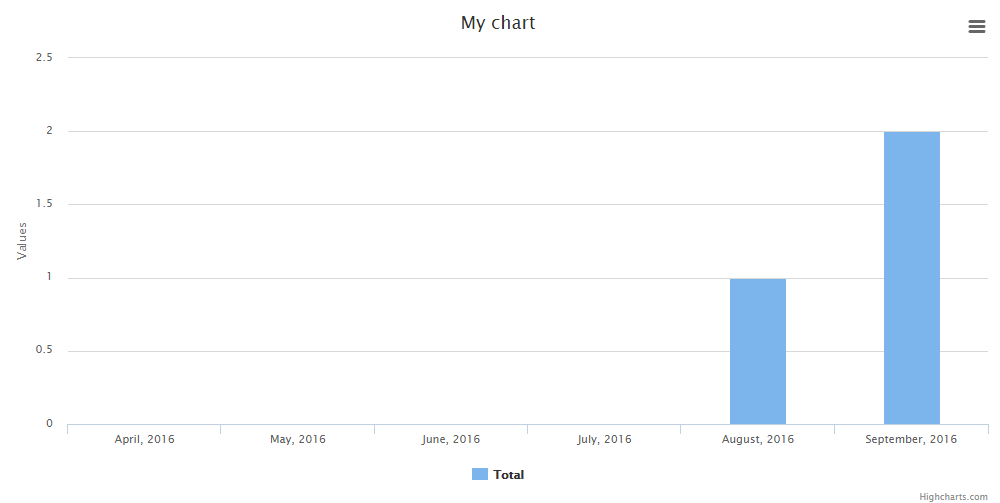
- lastByMonth(optional int $number, optional boolean $fancy)
Display the numbers of months behind (relative to the current date).
*Default:* ```$number = 6, $fancy = false```
```php
$chart = Charts::database(User::all(), 'bar', 'highcharts')
->elementLabel("Total")
->dimensions(1000, 500)
->responsive(false)
->lastByMonth();
// to display a number of months behind, pass a int parameter. For example to display the last 6 months and use a fancy output:
$chart = Charts::database(User::all(), 'bar', 'highcharts')
->elementLabel("Total")
->dimensions(1000, 500)
->responsive(false)
->lastByMonth(6, true);
```
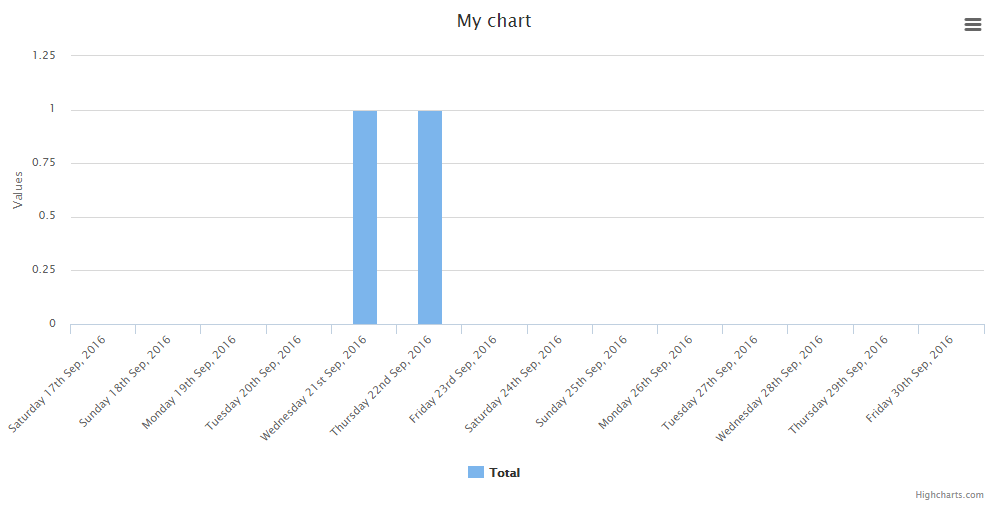
- lastByDay(optional int $number, optional boolean $fancy)
Display the numbers of days behind (relative to the current date).
*Default:* ```$number = 7, $fancy = false```
```php
$chart = Charts::database(User::all(), 'bar', 'highcharts')
->elementLabel("Total")
->dimensions(1000, 500)
->responsive(false)
->lastByDay();
// to display a number of days behind, pass a int parameter. For example to display the last 14 days and use a fancy output:
$chart = Charts::database(User::all(), 'bar', 'highcharts')
->elementLabel("Total")
->dimensions(1000, 500)
->responsive(false)
->lastByDay(14, true);
```
- preaggregated(boolean $preaggregated)
Set to true if using an aggregate database query such as count, max, min, avg, and sum.
```php
$data = Orders::select('orders.created_at', DB::raw('count(orders.id) as aggregate'))->groupBy(DB::raw('Date(orders.created_at)'))->get(); //must alias the aggregate column as aggregate
$chart = Charts::database($data)->preaggregated(true)->lastByDay(7, false);
```
- aggregateColumn(string $aggregateColumn, string $aggregateType)
This is similar to preaggregate. If you do not want to maintain extra data or
simply want to leverage the search speed of the database use preaggregate.
If you need to maintain the extra data from a record use this form (possibly for drilldown extension).
Pass in a string representation of a column containing numeric values to be summed.
Assume a collection of BankRecord with a numeric column called 'amount'.
```php
$chart = new Database(BankRecord::all(), 'bar', 'highcharts');
$chart->aggregateColumn('amount', 'sum');
```
This will yield summed values for column 'amount'.
### Database method alternative
When creating charts, you might wanna take full control of it, this might be done creating the chart with the ```create``` method
and adding the data from the database:
```
$data = Shopping::all();
$chart = Charts::create('bar', 'highcharts')
->title('My nice chart')
->elementLabel('My nice label')
->labels($data->pluck('shoppingDate'))
->values($data->pluck('price'))
->responsive(true);
```
## Multi Database Charts
Sometimes it might be usefull to create multi charts from diferent tables, right?
Fear no more, as this feature is there for you!
*Working Standard:* This chart is kinda special, the class extends the multi chart class and that means
that any option available in the multi chart is avalable here. BUT as this is a database chart, you
need to add the dataset in the following way:
```php
Charts::multiDatabase('line', 'material')
->dataset('Element 1', Users::all())
->dataset('Element 2', Posts::all());
```
And remember, you got all the database functions linked, meaning you're able to play with them as well like this:
```php
Charts::multiDatabase('line', 'material')
->dataset('Element 1', Users::all())
->dataset('Element 2', Posts::all())
->groupByMonth(2017, true);
```
**As mentioned above, this chart got all the available database methods and multi chart methods.**
## Realtime Charts
| Realtime Charts | line | area | bar | pie | donut | geo | gauge | temp | percentage | progressbar | scatter |
|-----------------|------|------|-----|-----|-------|-----|-------|------|------------|-------------|---------|
| echarts | - | - | - | - | - | - | - | - | - | - | - |
| chartjs | - | - | - | - | - | - | - | - | - | - | - |
| highcharts | x | x | x | - | - | - | - | - | - | - | - |
| google | - | - | - | - | - | - | x | - | - | - | - |
| material | - | - | - | - | - | - | - | - | - | - | - |
| chartist | - | - | - | - | - | - | - | - | - | - | - |
| fusioncharts | - | - | - | - | - | - | - | - | - | - | - |
| morris | - | - | - | - | - | - | - | - | - | - | - |
| plottablejs | - | - | - | - | - | - | - | - | - | - | - |
| minimalist | - | - | - | - | - | - | - | - | - | - | - |
| c3 | - | - | - | - | - | - | - | - | - | - | - |
| canvas-gauges | - | - | - | - | - | - | x | x | - | - | - |
| justgage | - | - | - | - | - | - | x | - | x | - | - |
| progressbarjs | - | - | - | - | - | - | - | - | x | x | - |
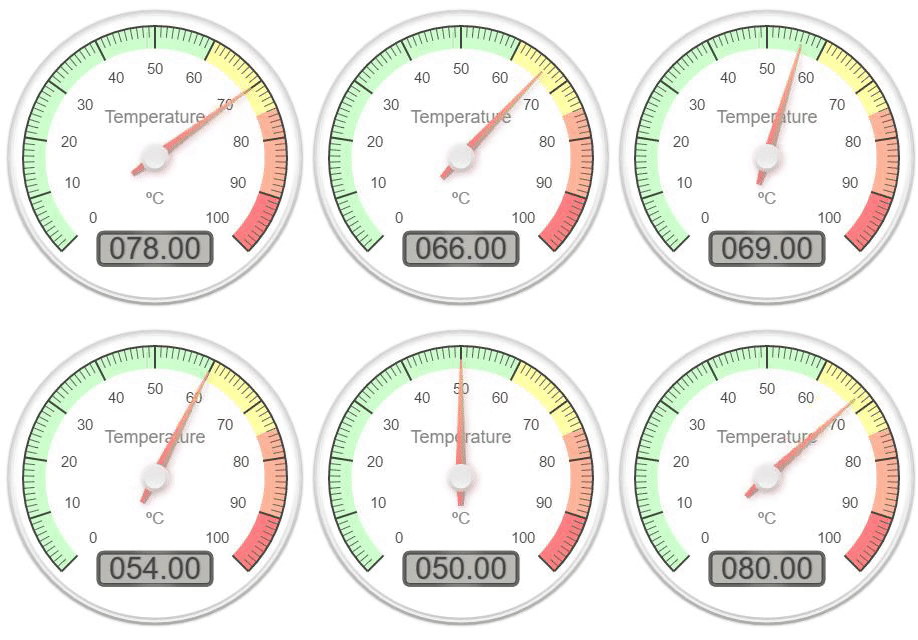
You can create realtime charts.
Example json:
```json
{"value":31}
```
'value' can be changed to different index name with ```valueName($string)```
```php
$chart = Charts::realtime(url('/path/to/json'), 2000, 'gauge', 'google')
->values([65, 0, 100])
->labels(['First', 'Second', 'Third'])
->responsive(false)
->height(300)
->width(0)
->title("Permissions Chart")
->valueName('value'); //This determines the json index for the value
```
**Note:** The interval is set in ms
The available methods are:
- valueName(required string $string)
Sets the value json index.
*Default:* ```value```
```php
$chart = Charts::realtime(url('/path/to/json'), 2000, 'gauge', 'google')
->values([65, 0, 100])
->labels(['First', 'Second', 'Third'])
->responsive(false)
->height(300)
->width(0)
->title("Permissions Chart")
->valueName('value'); //This determines the json index for the value
```
- url(required string $url)
Sets the url after chart object creation.
```php
$chart = Charts::realtime(url('/path/to/json'), 2000, 'gauge', 'google')
->values([65, 0, 100])
->labels(['First', 'Second', 'Third'])
->responsive(false)
->height(300)
->width(0)
->title("Permissions Chart")
->url(url('/new/json'));
```
- interval(required int $interval)
Sets the interval after chart object creation (ms).
```php
$chart = Charts::realtime(url('/path/to/json'), 2000, 'gauge', 'google')
->values([65, 0, 100])
->labels(['First', 'Second', 'Third'])
->responsive(false)
->height(300)
->width(0)
->title("Permissions Chart")
->interval(3000); // in ms
```
- maxValues(required int $number)
Sets the max amount of values to be seen before removing the first one.
```php
$chart = Charts::realtime(url('/path/to/json'), 1000, 'area', 'highcharts')
->responsive(false)
->height(300)
->width(0)
->title("Permissions Chart")
->maxValues(10);
```
## Math Functions Charts
You can create math function charts.
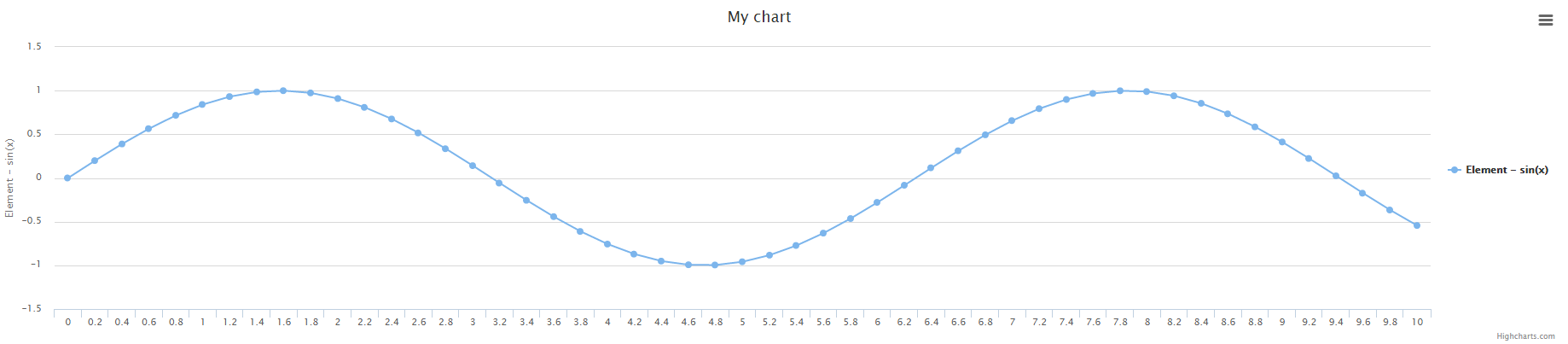
```php
Charts::math('sin(x)', [0, 10], 0.2, 'line', 'highcharts');
```
The function is ```sin(x)```, the interval is ```[0, 10]``` and the ```x``` amplitude is ```0.2```
- function(required string $function)
Sets the function.
```php
Charts::math('sin(x)', [0, 10], 0.2, 'line', 'highcharts')->mathFunction('x+1');
```
- interval(required array $interval)
Sets the function / chart interval.
```php
Charts::math('sin(x)', [0, 10], 0.2, 'line', 'highcharts')->interval([2, 8]);
```
- amplitude(required int $amplitude)
Sets the function amplitude between x points.
```php
Charts::math('sin(x)', [0, 10], 0.2, 'line', 'highcharts')->amplitude(0.5);
```
- calculate()
Calculates the values / labels for the chart.
**Note:** This function is called every time a modification is made in the chart function, interval or amplitude
so you don't need to call it every time you change the values. It's just an auxiliary function.
```php
Charts::math('sin(x)', [0, 10], 0.2, 'line', 'highcharts')->calculate();
```
## Charts Functions
- create(optional string $type, optional string $library)
Returns a new chart instance, if no library is specified, the default one will be used.
```php
Charts::create('line');
Charts::create('line', 'highcharts');
```
- database(required mixed $object, optional string $type, optional string $library)
Returns a new database chart instance that extends the base one.
```php
Charts::database(User::all());
Charts::create(User::all(), 'line', 'highcharts');
```
- realtime(required string $url, required int $interval, optional string $type, optional string $library)
Returns a new database chart instance that extends the base one.
```php
Charts::realtime(url('/json/data'), 2000, 'gauge', 'google')
```
- math(required string $function, required array $interval, required int $amplitude, optional string $type, optional string $library)
Returns a new math function chart instance that extends the base one.
```php
Charts::math('sin(x)', [0, 10], 0.2, 'line', 'highcharts');
```
- multi(optional string $type, optional string $library)
Returns a new multi chart instance that extends the base one.
```php
Charts::multi('line', 'material');
```
- multiDatabase(optional string $type, optional string $library)
Returns a new multi database chart instance that extends the multi chart but can use the database functions.
```php
Charts::multi('line', 'material');
```
- assets(optional array $libraries)
Returns all the assets to generate the graphs.
To output only certain libraries, add an array to it with the libraries you want
```php
// Using blade
{!! Charts::assets() !!}
// Only certain libraries
{!! Charts::assets(['google', 'chartjs']) !!}
```
- styles(optional array $libraries)
Returns all the style assets.
```php
// All libraries
{!! Charts::styles() !!}
// Only certain libraries
{!! Charts::styles(['google', 'material']) !!}
```
- scripts(optional array $libraries)
Returns all the script assets.
```php
// All libraries
{!! Charts::styles() !!}
// Only certain libraries
{!! Charts::styles(['google', 'material']) !!}
```
- libraries(optional string $type)
Returns an array of all the libraries available (can be filtered).
```php
// Return all the libraries available
print_r(Charts::libraries());
// Return all the libraries available for the line chart
print_r(Charts::libraries('line'));
```
- types(optional string $library)
Returns an array of all the chart types available (can be filtered).
```php
// Return all the chart types available
print_r(Charts::types());
// Return all the chart types available for the highcharts library
print_r(Charts::types('highcharts'));
```
## Available Chart Settings
- loader(required bool $loader)
Set the chart loader animation enabled or disabled.
```php
Charts::create('line', 'highcharts')->loader(false);
```
- loaderDuration(required int $duration)
Set the duration of the chart loader animation in ms.
```php
Charts::create('line', 'highcharts')->loader(true)->loaderDuration(2000);
```
- loaderColor(required string $color)
Set the loader color.
```php
Charts::create('line', 'highcharts')->loader(true)->loaderColor('#FF0000');
```
- backgroundColor(required string $background_color)
Set the background color for the loader.
```php
Charts::create('line', 'highcharts')->backgroundColor('#FF0000');
```
- template(required string $template)
Set an available color template for the chart.
*Note:* They are defined in ```config/charts.php``` file, under the templates key.
```php
Charts::create('line', 'highcharts')->template('material');
```
- oneColor(required bool $one_color)
Specifies if the chart will only use the first color, regardless of the ammount of values.
```php
Charts::create('line', 'highcharts')->oneColor(true);
```
- credits(required bool $credits)
Set the credits enabled or disabled if the library supports it.
```php
Charts::create('line', 'highcharts')->credits(false);
```
- container(required string $division)
Set a custom division ID to render the chart at
```php
Charts::create('line', 'google')->container('my-division-id');
```
- view(required string $view)
Set a custom view to render the chart
```php
Charts::create('line', 'google')->view('my.view');
```
- region(required string $region)
Set the region for google geo chart
*Default:* ```world```
```php
Charts::create('geo', 'google')->region('FR');
```
- gaugeStyle(required string $style)
Set the gauge style
*Default:* ```left```
*Available options:* ```left``` ```right``` ```center```
```php
Charts::create('gauge', 'google')->gaugeStyle('right');
```
- type(required string $type)
Set the chart type after creation (Example: from line to pie).
```php
Charts::create('line', 'highcharts')->type('pie');
```
- library(required string $library)
Set the chart library after creation (Example: from highcharts to google).
```php
Charts::create('line', 'highcharts')->library('google');
```
- labels(required array $labels)
The labels of the chart.
```php
Charts::create('line', 'highcharts')->labels(['First', 'Second', 'Third']);
```
- values(required array $values)
The values of the chart respectively.
```php
Charts::create('line', 'highcharts')->values([10, 50, 100]);
```
- elementLabel(required string $element_label)
The element label for line / bar / geo charts.
```php
Charts::create('line', 'highcharts')->elementLabel('Total Views');
```
- title(required string $title)
The chart title.
```php
Charts::create('line', 'highcharts')->title('My Chart');
```
- colors(required array $colors)
The colors of the charts respectively.
```php
Charts::create('line', 'highcharts')->colors(['#ff0000', '#00ff00', '#0000ff']);
```
- width(required int $width)
The chart width if non-responsive. 0 = responsive width.
```php
Charts::create('line', 'highcharts')->width(1000);
```
- height(required int $height)
The chart height if non-responsive. 0 = responsive height.
```php
Charts::create('line', 'highcharts')->height(500);
```
- dimensions(required int $width, required int $height)
The chart dimensions (shortcut to set width, height with one function).
```php
Charts::create('line', 'highcharts')->height(1000, 500);
```
- responsive(required boolean $responsive)
Set if the chart is responsive or not. If not, the chart dimensions will be used.
```php
Charts::create('line', 'highcharts')->responsive(false);
```
- legend(required boolean $legend)
Set whether to display the chart legend or not. Currently only works with ```highcharts```.
*Default:* ```true```
```php
Charts::create('line', 'highcharts')->legend(false);
```
- x_axis_title(required boolean $x_axis_title)
Set title of the x-axis. Currently only works with ```highcharts```.
*Default:* ```false```
```php
Charts::create('line', 'highcharts')->x_axis_title('Year');
```
- y_axis_title(required boolean $y_axis_title)
Set title of the y-axis. Currently only works with ```highcharts```.
*Default:* ```null```
*Note:* When set to ```null``` the value for element_label will be used instead.
```php
Charts::create('line', 'highcharts')->y_axis_title('Number of Units');
```
- language(required string $language)
Set the chart language. *(Only for database and multiDatabase charts)*. Will be
used before retrieve data with ->lastBy..() or ->GroupBy..() functions. It will translate
date labels.
```php
Charts::database(User::all(), 'line', 'highcharts')->language('es');
```
- settings()
Return the chart settings.
```php
print_r(Charts::create('line', 'highcharts')->settings());
```
- render()
Render the chart.
```php
echo Charts::create('line', 'highcharts')->labels(['One', 'Two'])->values([10, 20])->render();
```
## Chart Examples
### Pie
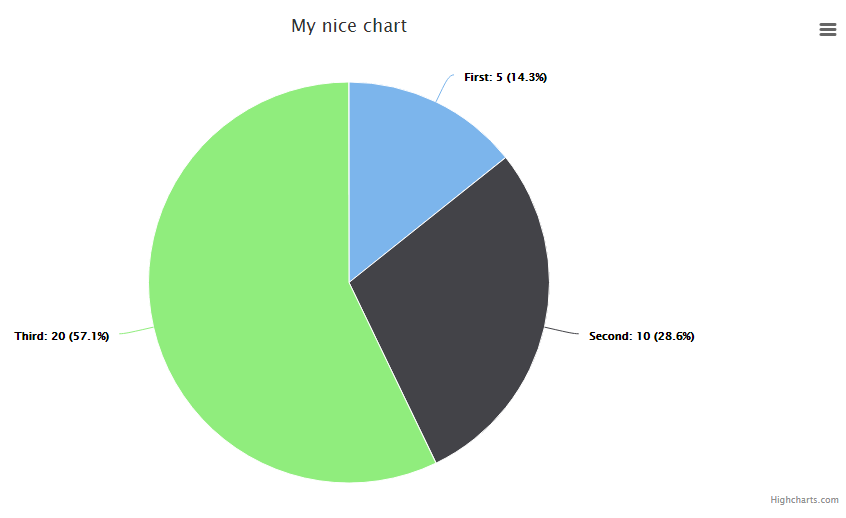
```php
Charts::create('pie', 'highcharts')
->title('My nice chart')
->labels(['First', 'Second', 'Third'])
->values([5,10,20])
->dimensions(1000,500)
->responsive(false);
```
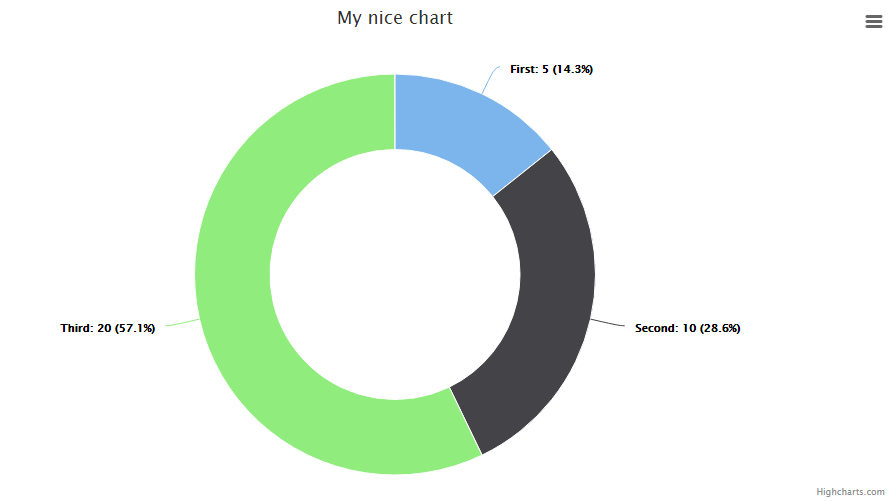
### Donut / Doughnut
Note: ```chartist``` can't change the color of this chart. Well it can but it's complicated, so I leave it here.
```php
Charts::create('donut', 'highcharts')
->title('My nice chart')
->labels(['First', 'Second', 'Third'])
->values([5,10,20])
->dimensions(1000,500)
->responsive(false);
```
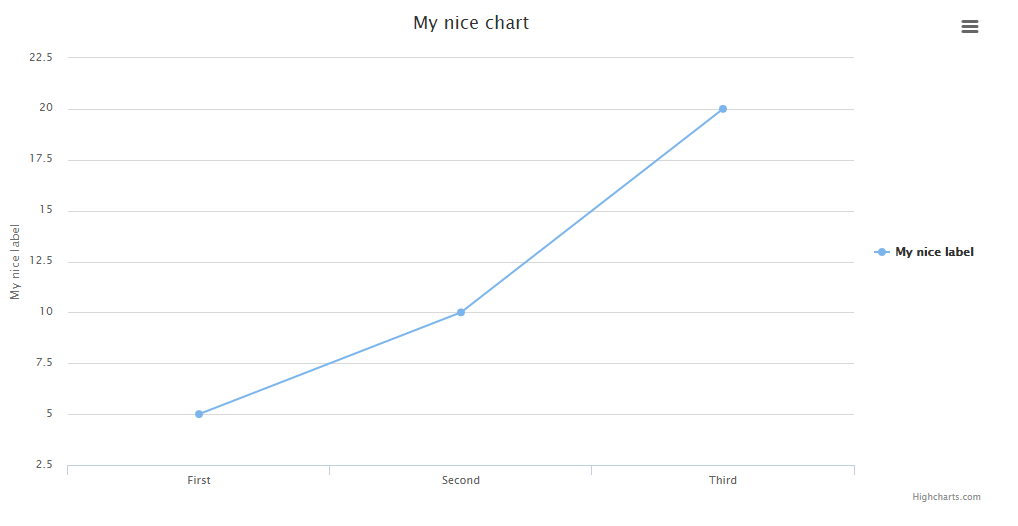
### Line
```php
Charts::create('line', 'highcharts')
->title('My nice chart')
->elementLabel('My nice label')
->labels(['First', 'Second', 'Third'])
->values([5,10,20])
->dimensions(1000,500)
->responsive(false);
```
### Area
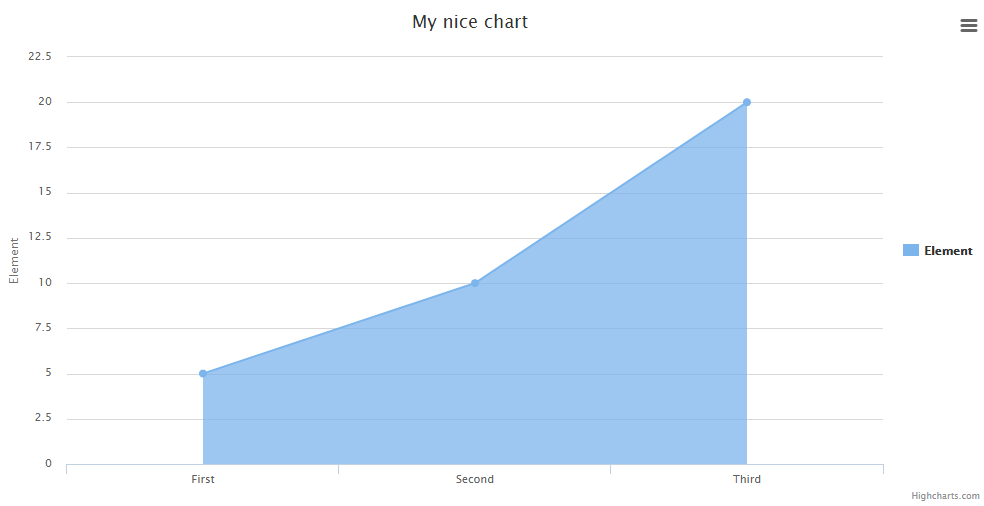
```php
Charts::create('area', 'highcharts')
->title('My nice chart')
->elementLabel('My nice label')
->labels(['First', 'Second', 'Third'])
->values([5,10,20])
->dimensions(1000,500)
->responsive(false);
```
### Areaspline
```php
Charts::multi('areaspline', 'highcharts')
->title('My nice chart')
->colors(['#ff0000', '#ffffff'])
->labels(['Monday', 'Tuesday', 'Wednesday', 'Thursday', 'Friday','Saturday', 'Sunday'])
->dataset('John', [3, 4, 3, 5, 4, 10, 12])
->dataset('Jane', [1, 3, 4, 3, 3, 5, 4]);
```

### Bar
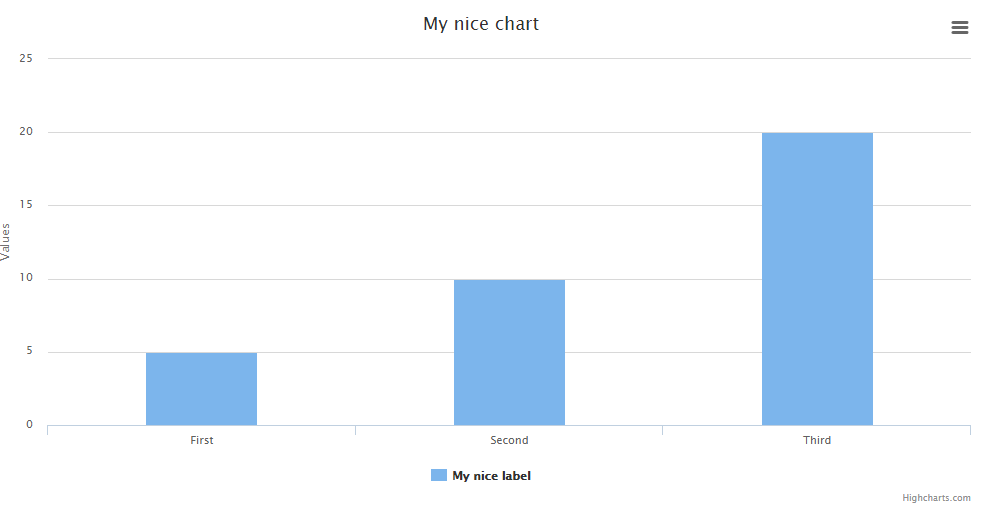
```php
Charts::create('bar', 'highcharts')
->title('My nice chart')
->elementLabel('My nice label')
->labels(['First', 'Second', 'Third'])
->values([5,10,20])
->dimensions(1000,500)
->responsive(false);
```
### Geo
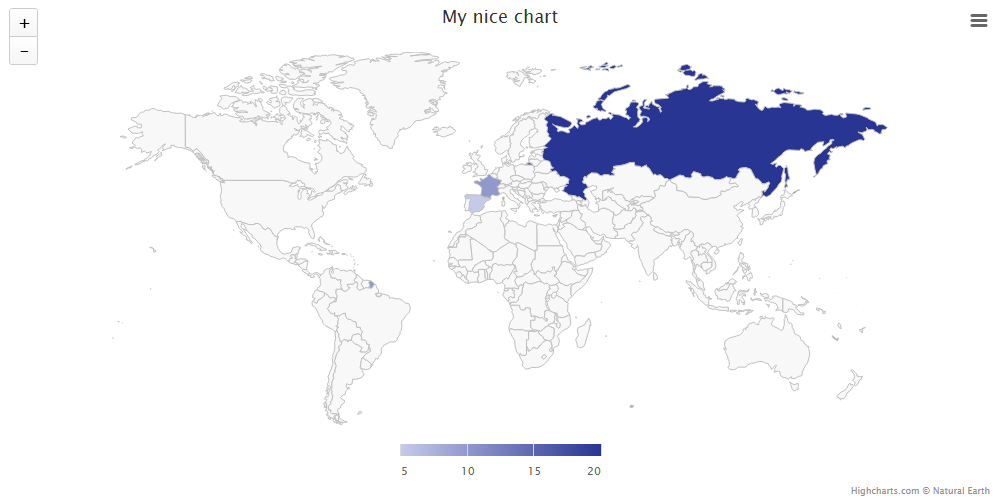
Note: The labels must have the country codes, not the name.
Note 2: To add color to the chart, you'll need to provide an array of at least 2 colors. The first is the min and the second the max.
```php
Charts::create('geo', 'highcharts')
->title('My nice chart')
->elementLabel('My nice label')
->labels(['ES', 'FR', 'RU'])
->colors(['#C5CAE9', '#283593'])
->values([5,10,20])
->dimensions(1000,500)
->responsive(false);
```
### Gauge
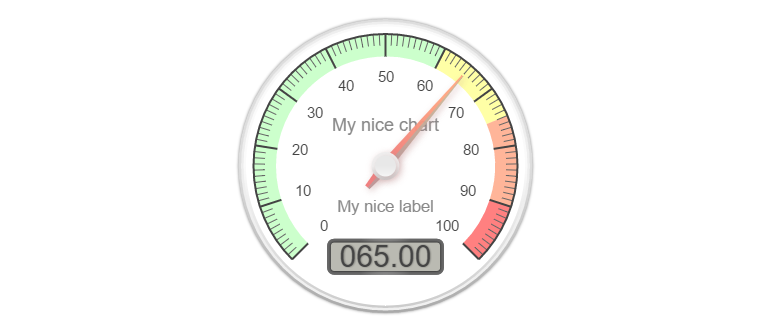
Note: You either need 1 value or 3 following this standard: ```[actualValue, minValue, maxValue]```
```php
Charts::create('gauge', 'canvas-gauges')
->title('My nice chart')
->elementLabel('My nice label')
->values([65,0,100])
->responsive(false)
->height(300)
->width(0);
```
### Temperature
Note: You either need 1 value or 3 following this standard: ```[actualValue, minValue, maxValue]```
```php
Charts::create('temp', 'canvas-gauges')
->title('My nice chart')
->elementLabel('My nice label')
->values([65,0,100])
->responsive(false)
->height(300)
->width(0);
```
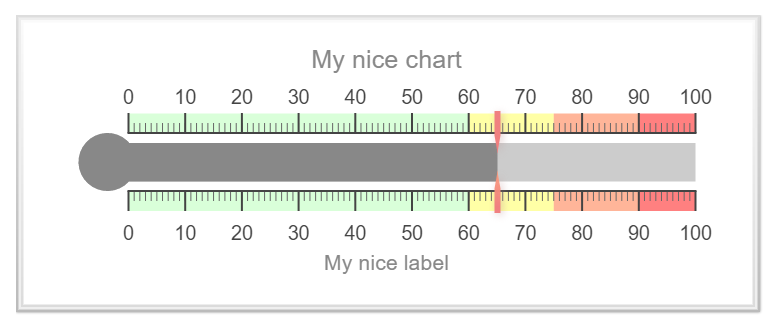
### Percentage
Note: You either need 1 value or 3 following this standard: ```[actualValue, minValue, maxValue]```
```php
Charts::create('percentage', 'justgage')
->title('My nice chart')
->elementLabel('My nice label')
->values([65,0,100])
->responsive(false)
->height(300)
->width(0);
```
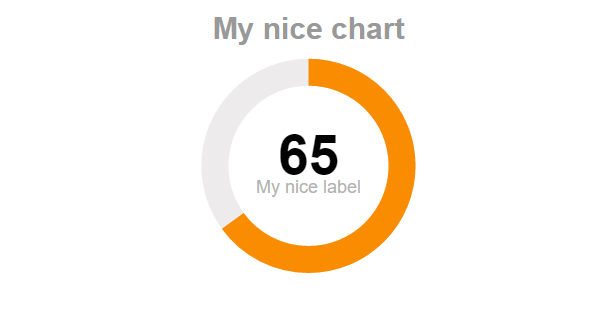
### Progressbar
Note: You either need 1 value or 3 following this standard: ```[actualValue, minValue, maxValue]```
```php
Charts::create('progressbar', 'progressbarjs')
->values([65,0,100])
->responsive(false)
->height(50)
->width(0);
```

### Credits Disable
Note: ```highcharts``` credits disable available. Default credits is enable.
```php
Charts::multi('line', 'highcharts')->credits(false);
```
## Charts in tabs
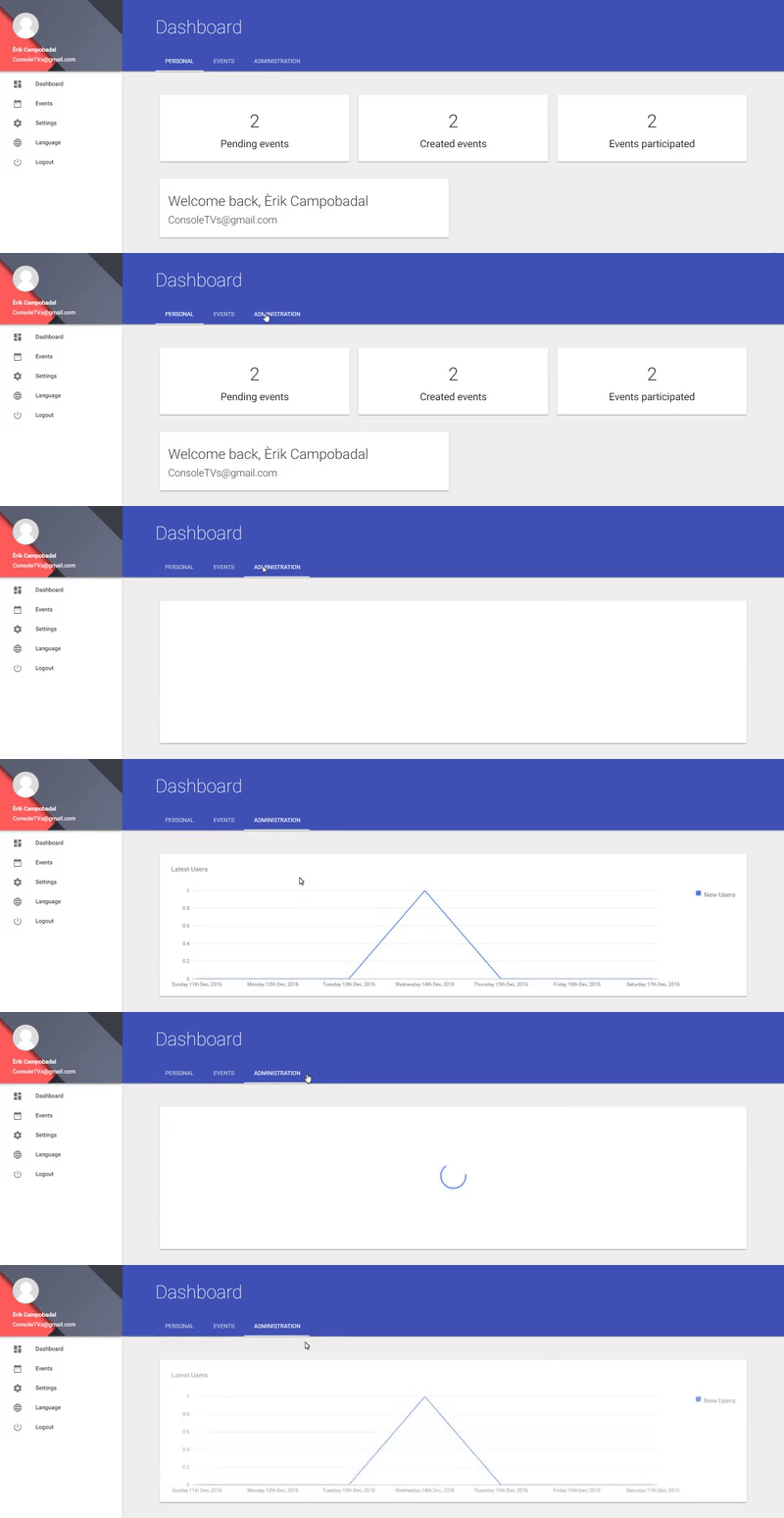
Rendering charts on tabs will cause them to render very bad. The cause is that unactive tabs have no
dimensions and charts try to adapt to a 0 dimensions division.
Lucky for you I'll add a quick method to make it work!
1. Create a layout, call it something like: ```layoyts/charts.blade.php```
```
{!! Charts::assets() !!}
@yield('chart')
```
2. Create a new folder where you'll add all charts, for example: ```charts/```
3. Create a new file inside, for example: ```latest_users.blade.php``` and add the chart
```
@extends('layouts.charts')
@section('chart')
{!! Charts::database(App\User::all(), 'line', 'material')->dimensions(0,$height)->title('Latest Users')->lastByDay(7, true)->elementLabel('New Users')->render() !!}
@endsection
```
4. Create a new route in ```routes/web.php```
```
Route::get('/charts/{name}/{height}', 'ChartsController@show')->name('chart');
```
5. Create a new Controller ```ChartsController```
```
protected_charts)) {
$this->checkProtected();
}
return view("charts.$name", ['height' => $height]);
}
/**
* Protected charts will go here first.
* You can change this condition how you like.
*/
public function checkProtected()
{
if(!Auth::user()->admin) {
abort(404);
}
}
}
```
Make sure to change your stuff, it's all documented
6. Go to your view where you have your tabs, and inside that tab you like add the chart iframe with the height.
**Note:** This example uses materializecss. They have a loader that makes it cooler to load up charts :)
```
@php $chart_height = 300; @endphp
```
7. Add this script changing the tab id with yours
**Note:** As you can see it also uses the loader from materializecss, you can remove them as well.
```
```
## Extend your way!
You can create your own Charts by forking this repository. The ```src/Templates``` folder contains all the current charts, but you can
add yours like this:
### Create a new file
Create a new file, the syntax is: ```library.type.php```
if your chart library is called: ```mylib```
and your template is for the line chart: ```line```
Then you create a file like this: ```mylib.line.php```
To call it later, just use:
```php
$chart = Charts::create('line', 'mylib');
```
You will need to add the CSS / JS to the includes.php file found in the ```/src``` folder.
You have plenty of examples to see how to put the data so just take a closer look at all the included templates before doing yours!